Walee's Blog
A blog to discuss all things Ai Agent Frameworks and Platforms
Create a Zerepy Agent that uses llama3.2:1b via Ollama
Used the following versions when writing this blog
python - 3.12.8 (had issues with 3.13.1)
poetry - 1.8.5
Check out my GitHub repository for the source code: Zerepy Hello World
Faster Route
git clone --branch ollama https://github.com/wale-e/ZerePy.git   # clone repository
cd zerepy  # change to the zerepy direction
# install python 3.12.8  (instructions below)
# install poetry 1.8.5   (instructions below)
poetry env use python3.12    # ensure poetry the correct Python version
poetry install --no-root   # install dependencies
poetry shell    # activate the virtual environment"
# follow step from "Run the agent below"
Longer Detailed Route
Installation
First install python (version 3.12.8) if you haven’t, Python downloads
Make sure python is present in your path
python3 --version
should return Python 3.12.8
Install Poetry for dependency management if you haven’t already
Follow the steps here to use the official installation
Clone the repository
git clone https://github.com/blorm-network/ZerePy.git
Go to the zerepy directory
cd zerepy
Install dependencies
poetry install --no-root
This will create a virtual environment and install all required dependencies.
Ensure poetry uses the correct Python version
poetry env use python3.12
In src/connections/ folder create ollama_connection.py
touch ./src/connections/ollama_connection.py
Copy the content of this file from github into ollama_connection.py
Edit the src/agent.py
Change the section below
# Extract Twitter config
twitter_config = next((config for config in agent_dict["config"] if config["name"] == "twitter"), None)
if not twitter_config:
    raise KeyError("Twitter configuration is required")

# TODO: These should probably live in the related task parameters
self.tweet_interval = twitter_config.get("tweet_interval", 900)
self.own_tweet_replies_count = twitter_config.get("own_tweet_replies_count", 2)
To
# Extract Twitter config
twitter_config = next((config for config in agent_dict["config"] if config["name"] == "twitter"), None)
if twitter_config:
    # Set Twitter-specific variables only if the config exists
    self.tweet_interval = twitter_config.get("tweet_interval", 900)
    self.own_tweet_replies_count = twitter_config.get("own_tweet_replies_count", 2)
else:
    logger.info("No Twitter configuration found. Skipping Twitter integration.")
Change the section below
if not self.username:
    raise ValueError("Twitter username is required")
To
if not self.username:
    logger.info("Twitter username not configured. Skipping Twitter-specific functionality.")
Edit the src/connection_manager.py
After
from src.connections.farcaster_connection import FarcasterConnection
Add
from src.connections.ollama_connection import OllamaConnection
After
elif class_name == "eternalai":
    return EternalAIConnection
Add
elif class_name == "ollama":
    return OllamaConnection
Create an ollama.json file in the agents folder
#assumes you are at the root of project (zerepy)
touch ./agents/ollama.json
Copy the copy of this file from github into agents/ollama.json
Edit agents/general.json to make Ollama the default agent on startup
{
  "default_agent": "ollama"
}
Activate the virtual environment
poetry shell
Run the agent
poetry run python main.py
At the prompt ZerePy-CLI (ollama) type ‘chat’
ZerePy-CLI (ollama) > chat
At the You prompt ask the chatbot any question
You: What is quantum computing
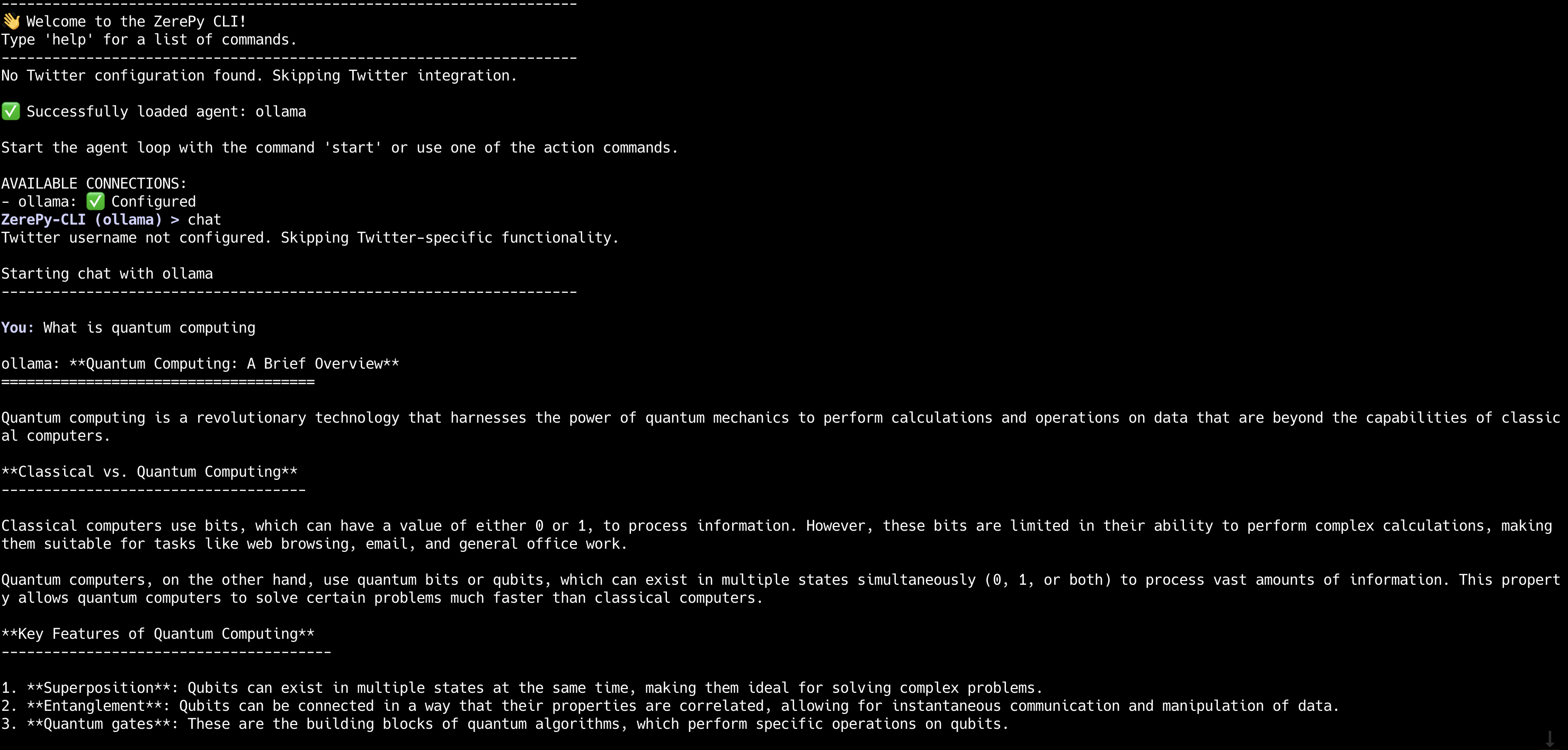
This completes your hello world Zerepy introduction
Congratulations you have successful run your first Zerepy Ai Agent
Project maintained by wale-e Hosted on GitHub Pages — Theme by mattgraham